Project detail
Clicking a project opens a detail webview tab titled priint:cloud [Tenant] / [Project].
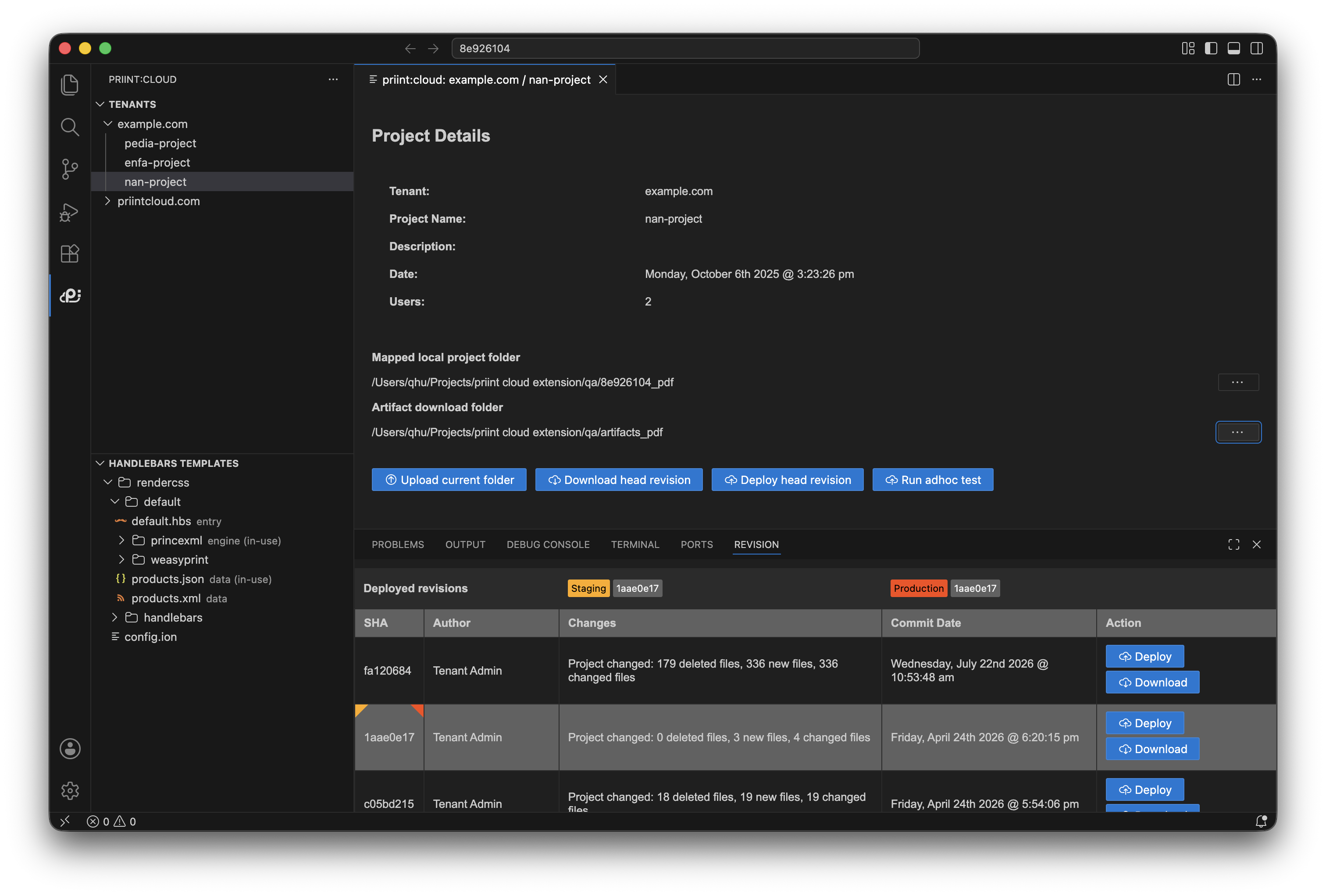
The detail view shows:
- Project name, description, creation date, and user count
- Mapped local project folder — the local folder used when downloading files to your machine
- Artifact download folder — where downloaded build artifacts are saved
Set the mapped local folder
Click the ⋯ (ellipsis) next to Mapped local project folder and select a folder. This path is stored per project and used as the extraction target when you download revisions.
Set the artifact download folder
Click the ⋯ next to Artifact download folder and select a folder. Build artifacts (output files from a deploy or test) are saved here.
Action buttons
| Button | Availability | What it does |
|---|---|---|
| Upload current folder | Always | Uploads the open workspace to this project (see Upload) |
| Download head revision | Always | Downloads the latest revision to the mapped local folder |
| Deploy head revision | Active projects only | Starts a deploy workflow for the latest revision |
| Run adhoc test | Active projects only | Runs an isolated test build (see Adhoc tests) |
Note: "Active" means the project is enabled for deployment on the server. Inactive projects can still be downloaded.