Overview
The priint:cloud extension for Visual Studio Code lets you connect to a priint:cloud account, manage projects, upload and deploy revisions, edit and preview Handlebars templates — all without leaving the editor.
The extension is available in the Visual Studio Marketplace.
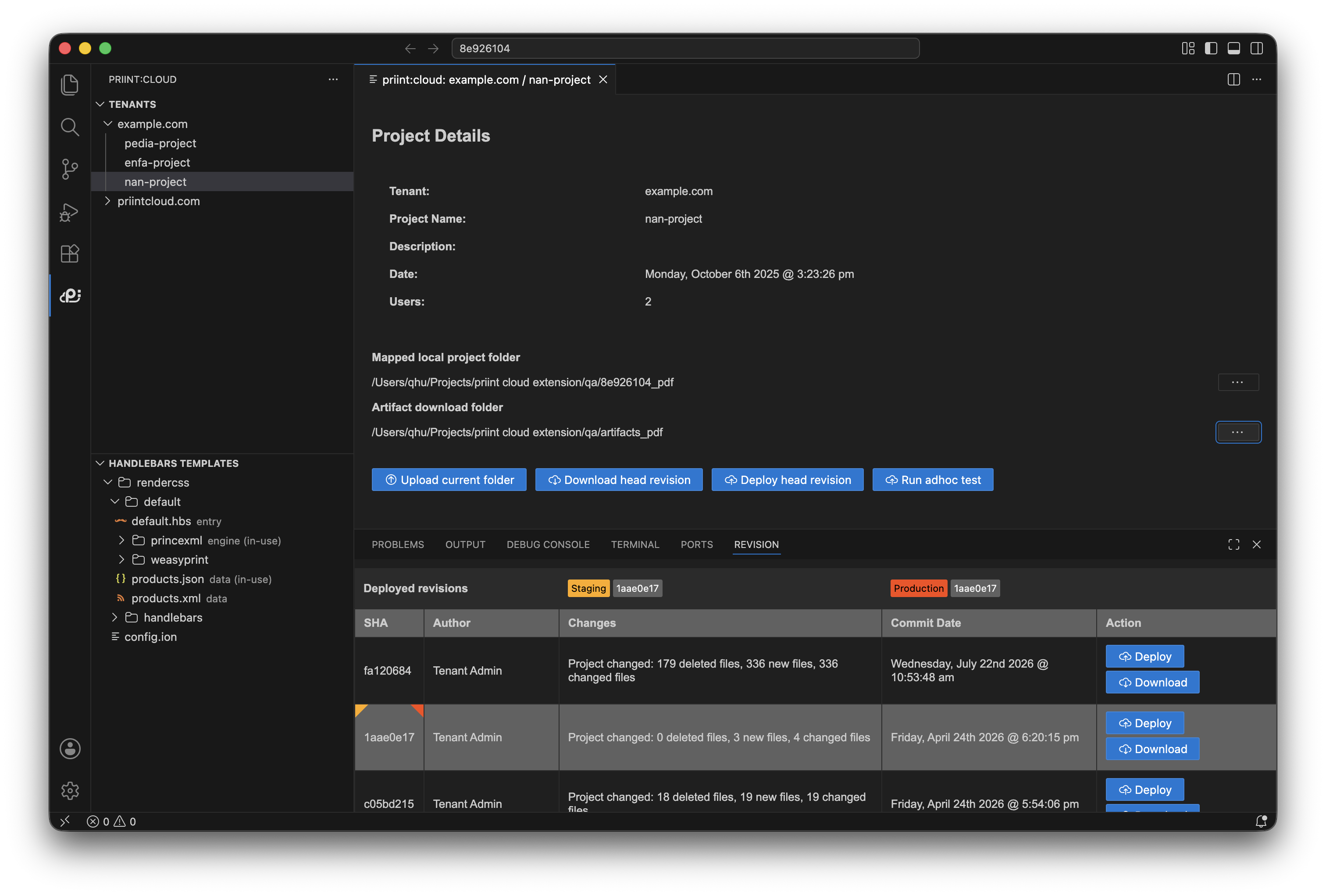
Quick start
- Login using priint:cloud account
- Tree view in the main side bar for exploring available project
- Handlebars templates view below the projects tree view
- Project detail view in the main view
- Revision view in bottom panel that displays all revison of selected project
Useful commands
| Command | Description |
|---|---|
| Login | Login to the application, choose which system should be used in this process |
| Logout | Logout to the application |
| Refresh project list | Refresh the project list in main sidebar |
| Upload current project | Zip and upload opening project |
| Download head revision | Download head revision of selected project |
| Deploy head revision | Deploy head revision of selected projectq |
| Set artifact download location | Select artifact download location |
On-screen functionalities
| Button | Description |
|---|---|
| Upload current folder | Upload current opening workspace |
| Download head revision | Download head revision to selected folder |
| Deploy head revision | Deploy head revision |
| Deploy | Deploy specific revision where the button is placed |
| Upload project for adhoc testing | Zip and upload opening project and run adhoc test |
| Download | Download specific revision where the button is placed |